A buyer comes to your stand, talks with your team, takes your catalogue, and walks on to the next stand. By the evening they have met dozens of exhibitors, and most catalogues end up in one bag. Wouldn't you want them to get a thank-you from you, soon after they leave, with your contact details and the catalogue of the products they asked about? Your company stays in their mind, and they see how organised you are. Potlee Expo does exactly this, by itself. This page shows how to set it up, what your visitor gets, and the rules that protect you, with the exact words you will see on screen.
Watch: Thank-you email after every stand visit, the whole setup and what your visitor gets (7 min, English, with chapters).
What is the thank-you email after the visit?
Definition: The thank-you email after the visit is a Potlee Expo setting that emails each visitor of your exhibition stand, by itself, soon after they leave: it thanks them, lists the products they asked about with each catalogue PDF, and carries the visiting card of the person who met them.
It is a setting of your stand, not a new app. Your team keeps sending cards, voice notes and photos to Potlee on WhatsApp, and the email follows by itself.
What goes in the email, and what never does
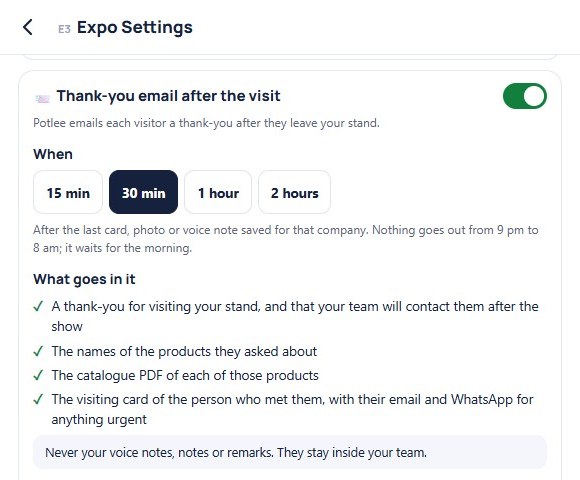
Settings › 📨 Thank-you email after the visit lists it in four lines, word for word:
- A thank-you for visiting your stand, and that your team will contact them after the show
- The names of the products they asked about
- The catalogue PDF of each of those products
- The visiting card of the person who met them, with their email and WhatsApp for anything urgent
And under it, in a grey box: Never your voice notes, notes or remarks. They stay inside your team. What your team says about a buyer at the stand is for your team only. The visitor sees only what you would hand them yourself.
Set it up in 5 steps
Step 1: Open the settings
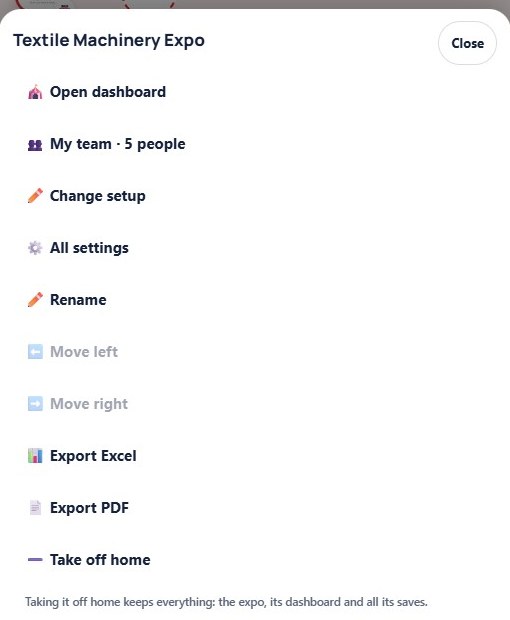
- On Home, every expo you join has its own icon, under Expo.
- Right-click the icon, or on a phone press and hold it, and click ⚙️ All settings.
- Scroll down to Thank-you email after the visit. It sits under your stand's settings.
Only the team leader can switch it on or change it. The rest of the team sees the same page, but can't change it.
Step 2: Switch it on, and pick when
- Click the switch: Send a thank-you email after the visit.
- Pick when it goes: 15 min, 30 min, 1 hour or 2 hours after the visit.
The wait counts from the last card, photo or voice note your team saved for that company. If your team saves something new, the wait starts again, so the visitor gets one email with everything, not three. Say a card is saved at 15:05 and a voice note at 15:10: with 30 minutes picked, the email goes at about 15:40. And nothing goes out from 9 pm to 8 am. It waits for the morning.
Step 3: Add your product catalogues
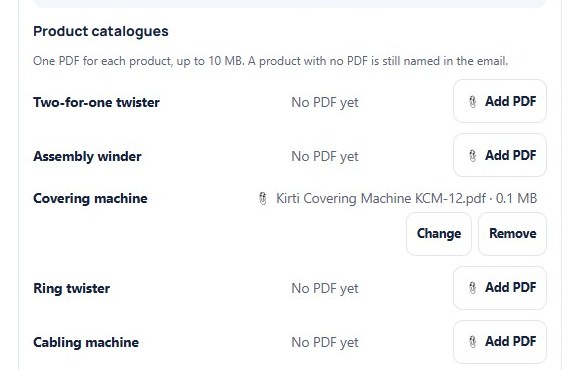
- Product catalogues lists every product of your stand.
- Click 📎 Add PDF next to a product and pick its catalogue, up to 10 MB.
- The file shows, with its size. Change it or Remove it any time.
Each visitor gets only the catalogues of the products they asked about, not your whole range. A product with no PDF is still named in the email.
Step 4: Check your team's visiting cards
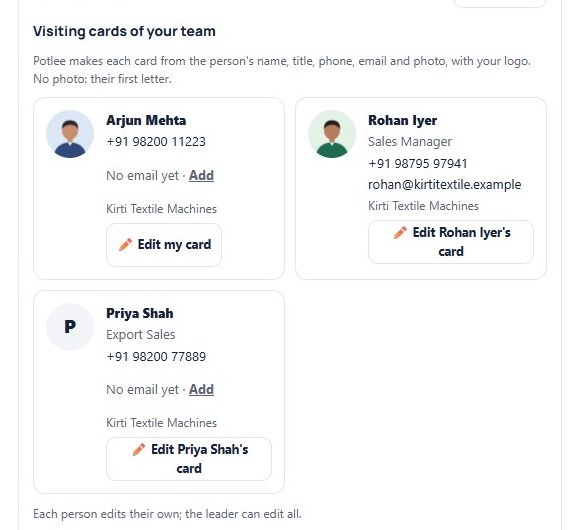
- Under Visiting cards of your team, Potlee makes a card for each person on your stand, from their name, title, phone, email and photo, with your logo. No photo? Their first letter.
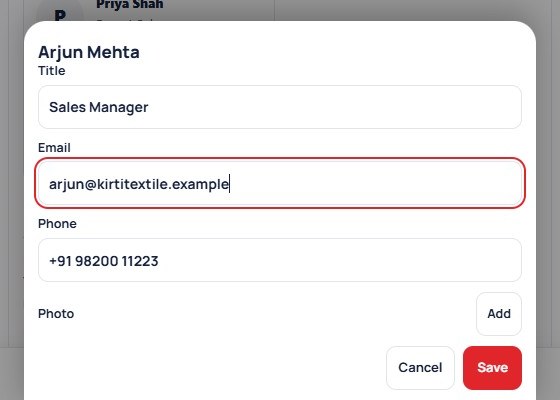
- Click ✏️ Edit my card, type your title, check your phone and email, add a photo, and click Save.
- Someone has no email yet? Click Add, so visitors can write to them.
Each person edits their own card. The leader can edit everyone's.
Step 5: Sending account and postal address
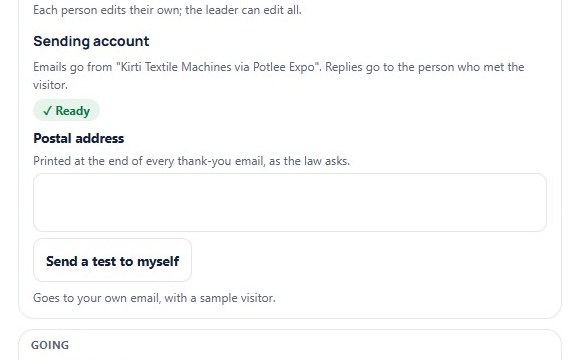
- Emails go from your company's name, via Potlee Expo. Replies go to the person who met the visitor.
- The Potlee team sets up your sending account for you. When it's done, you see ✓ Ready.
- Type your Postal address. It is printed at the end of every email, as the law asks.
No address, no email: Potlee waits until you add one.
Send a test to yourself
Before the show, see the email for yourself. Click Send a test to myself. It goes to the email on your own visiting card, with a sample visitor, so check that your card has your email first.
What your visitor gets
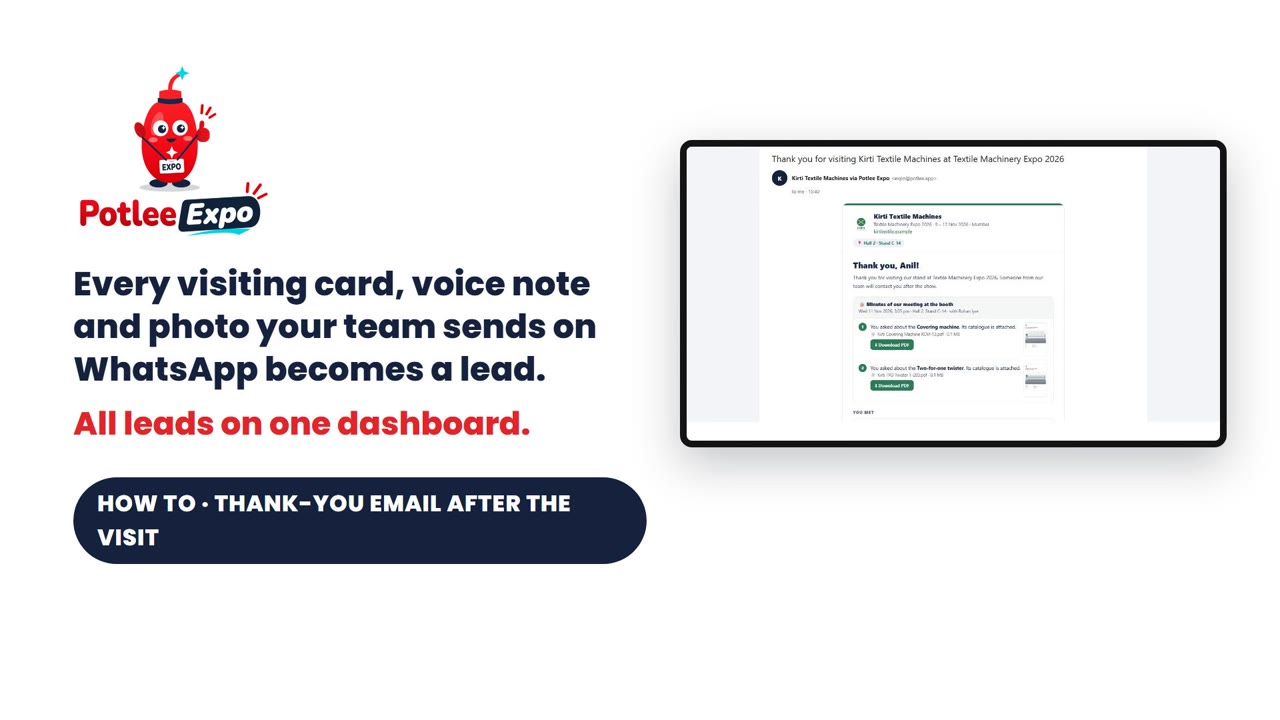
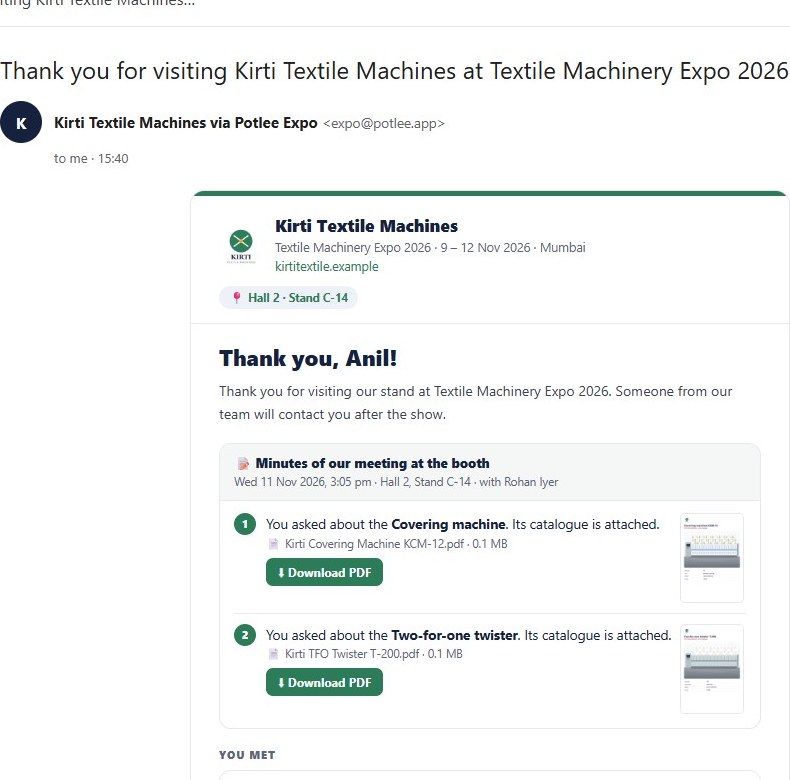
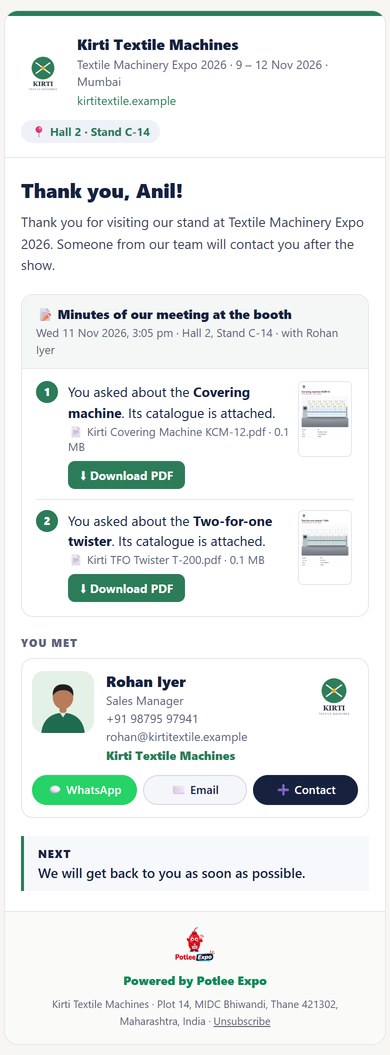
Now the visitor's side. Thirty minutes after their visit, this email lands in their inbox. Part by part:
- It comes from your company, via Potlee Expo.
- At the top: your logo, your company's name, the expo with its dates, and your hall and stand.
- It thanks them by name, and says your team will contact them after the show.
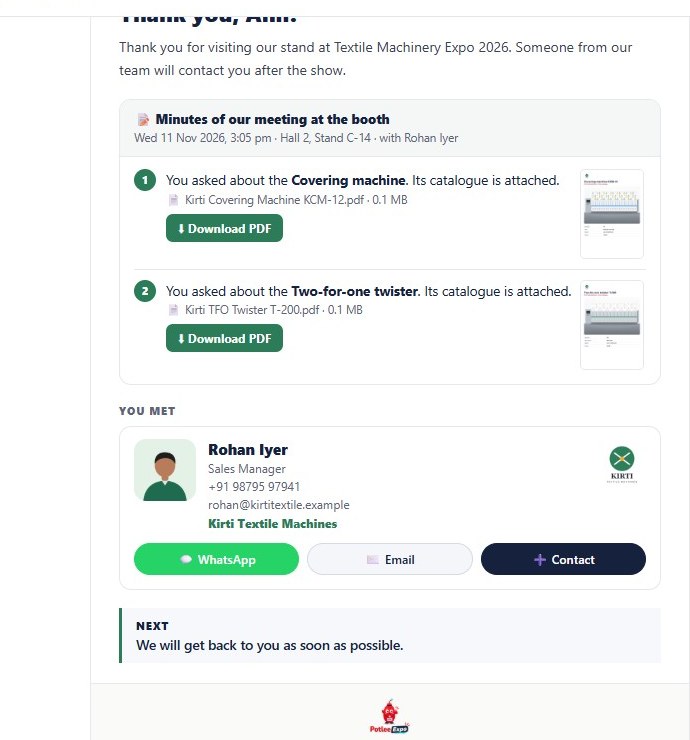
- Then the Minutes of our meeting at the booth: the day and time of the visit, and who they met.
- One point for each product they asked about, with its catalogue: the front page, the file and its size. They tap ⬇ Download PDF and the catalogue opens. It is attached to the email too.
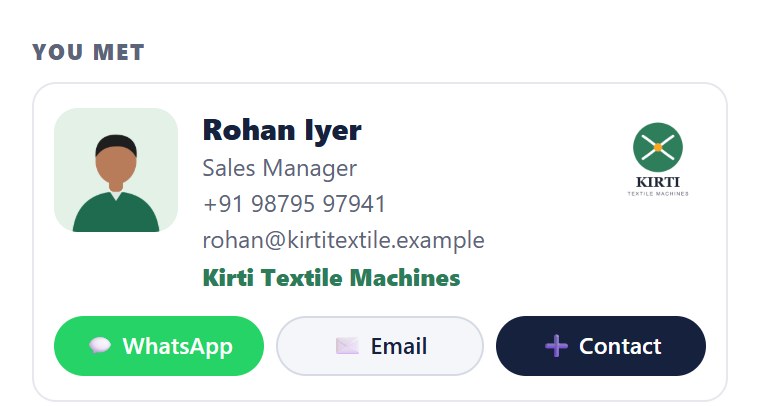
- The visiting card of the person they met. On a phone, three small buttons: WhatsApp opens a chat with your salesperson, Email writes to them, and ➕ Contact saves your salesperson in their phone, in one tap. Tapping the card does the same.
- Next: your team will get back to them soon. And at the bottom, your postal address.
When they reply, the reply goes straight to the person who met them, and that person gets a copy of the email too.
At the stand: what makes it go
At the stand, your team does what it always does: sends the visitor's card, a voice note or a photo to Potlee on WhatsApp. Two things make the email go:
- The card has an email address. If not, the company's page says "✉️ No email on the card: nothing to send".
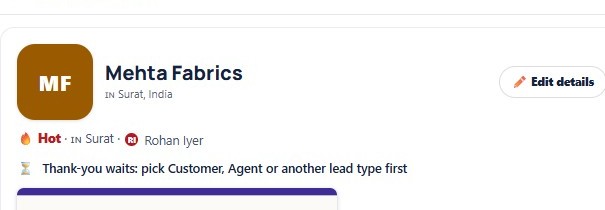
- The lead has a type, like Customer or Agent. Without a type, the email waits, and the page says "⏳ Thank-you waits: pick Customer, Agent or another lead type first".
Competitors, suppliers and other contacts never get one. Only your visitors do.
Follow it on your dashboard
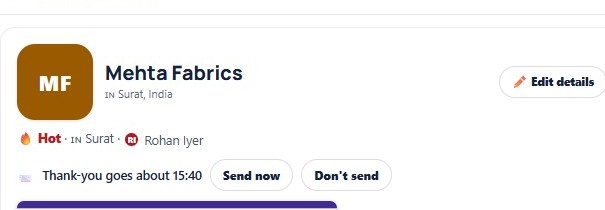
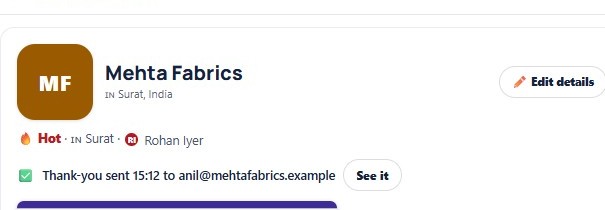
- Open any company's page, and one line tells you where its thank-you is.
- Waiting? Send now sends it straight away. Don't send stops it for this company.
- Once it's sent, the line shows when, and to which address. See it shows the exact email they got.
- No email on the card? Click Add email, type it, and the thank-you goes within minutes.
- If an email could not be sent, Potlee won't try again by itself. Click Send again.
- After the fair, From stand to order counts every thank-you sent. Click it, and those leads open.

By hand, or by Potlee Expo
| Thank-you by hand after the show | Potlee Expo thank-you email | |
|---|---|---|
| When it reaches the visitor | Days or weeks after the show | 15 minutes to 2 hours after the visit |
| Catalogue | Whole range, or forgotten | Only the products they asked about, as PDFs |
| Who they met | Often lost | That person's visiting card, one tap to WhatsApp or save |
| Notes and remarks | Risk of a wrong paste | Never sent: they stay inside your team |
| Replies | To a shared inbox | Straight to the person who met them |
| Your effort | Typing every email | Set up once in All settings |
Rules that protect you
- One thank-you per company, never two.
- Never more than two days after the visit. If it can't go by then, it doesn't go at all.
- Nothing at night: nothing goes out from 9 pm to 8 am.
- Unsubscribes are always kept: Unsubscribe in the email stops every email from your company, for good.
- Your notes never leave your team.
From a stand visit to a relationship
Your visitor leaves your stand, and within the hour your catalogue, your salesperson's card and a one-tap WhatsApp are on their phone. When you call after the show, they already know you, they have your catalogue, and your number is saved in their phone. That's how a ten-minute visit becomes a long relationship. Turn it on today, in All settings.
Your checklist before the show
- Thank-you email after the visit switched on, and the wait picked
- A catalogue PDF added for each product you will show
- Every team member's card has a title, phone and email
- Sending account shows ✓ Ready
- Postal address typed
- A test sent to yourself and read on your phone
- Your team knows: every visitor needs a lead type, like Customer or Agent
Get Potlee Expo Now
Send REGISTER EXPO to +91 91068 47981 on WhatsApp, or tap here to open WhatsApp. More about Potlee Expo for exhibitors: potlee.app/expo.
New to Potlee Expo? Start with how to set up Potlee Expo. More how-to videos: the Potlee Expo: How to playlist on YouTube.
Turn Expo Visitors Into Customers.
Be a Smart Exhibitor with Potlee Expo.