You already forward everything on WhatsApp. Potlee keeps it all in one place, and gives it back when you need it. At an expo, forward every visiting card, catalogue, machine photo and voice note as you walk the halls; Potlee reads each card, so you find any supplier again in seconds.
The Potlee Visitor KitEverything you can save with Potlee at any expo
Visiting cardsCataloguesBrochure PDFsStall photos & selfiesMachine videosVoice notesPrice listsLinksExcel of every contactVisiting cardsCataloguesBrochure PDFsStall photos & selfiesMachine videosVoice notesPrice listsLinksExcel of every contact
The expo problem
Why most expo visits go to waste
You travel, book a hotel, buy a pass and spend days on your feet. Then the week after the show, you can't find the one supplier you came for.
Huge shows, too many hallsBig expos run over many halls and several days. By the second hall the first one is a blur.
Hundreds of people, few you rememberFaces, names and companies mix up. Which stall quoted the better price?
Cards in pockets, notes on paperVisiting cards end up loose in a bag; notes are on brochures, receipts and the back of cards.
Photos lost in the galleryMachine photos sit between family pictures and screenshots, with no name of the company.
PDFs and voice notes scatteredCatalogue PDFs in Downloads, voice notes in WhatsApp chats, links in browser tabs.
No summary at the end of the dayYou are too tired at night to sort anything. The day's effort goes in vain.
Catalogue bags too heavy to carryBrochures weigh kilos. From an international expo you leave most of them in the hotel.
Follow-ups start lateBy the time you sort it all, suppliers have forgotten you and the boss is still waiting for a report.
With Potlee you forward each card, catalogue, photo, video and voice note on WhatsApp at the stall. Potlee reads every card and writes every voice note down as text, so in the evening you search a name, a company or a product and it comes back. Every contact downloads as Excel, ready for Google Sheets:
Card4 photos2 videosVoice noteCompare spindle speed with last year's model
E
Embroidery-machine dealer · LudhianaPartner
CardPrice list1 video12-head machine, quote by Friday
C
Cotton-yarn spinner · HyderabadExport Manager
CardCatalogueVoice noteInterested in 2/40s twisting
A
Air-jet loom maker · BhiwandiOwner
Card5 photosBrochure PDFVisit factory after the show
…and 8 more stallsDownload ExcelOpen in Google Sheets
Potlee at the expo
Be a Smart Visitor at every expo
Everything you collect at the show, you forward to Potlee on WhatsApp: visiting cards, brochure PDFs, machine videos, voice notes, selfies, price lists, links and catalogues. Potlee reads each one, so in the evening you can search it all at potlee.app.
📷 Photo of a visiting card10:14
Saved to Potlee ✅🔒 (1 card)Open Potlee
Visiting cardSales Head · Rapier-loom maker+91 98XXX XXX17 · sales@example.com
Preview
1. Every card, read for you
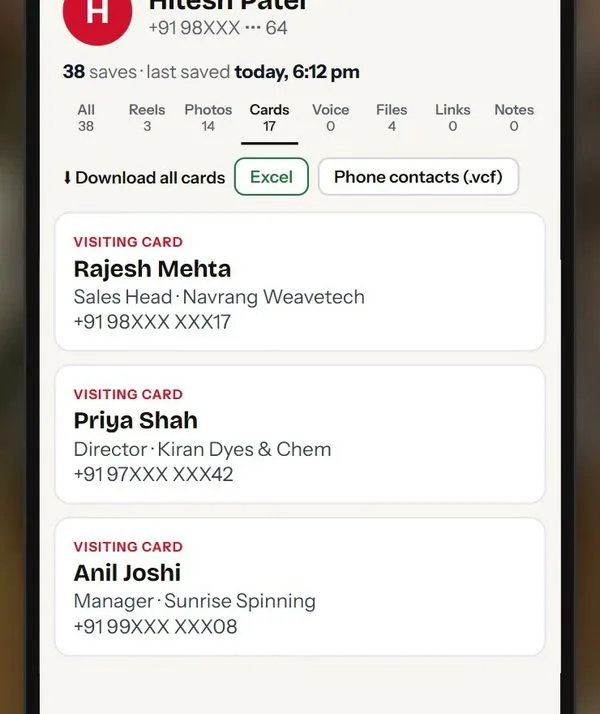
Snap the visiting card at the stall. Potlee reads the name, company, phone and email for you.
📄 Catalogue_2026.pdf18 pages · PDF
Saved to Potlee ✅🔒 (1 file)Open Potlee
Preview
2. Catalogues and PDFs
Forward the catalogue PDF or brochure photos. Potlee reads the text, so you can search inside it later.
🎤 Voice note · 0:0911:02
Saved to Potlee ✅🔒 (1 voice note)Open Potlee
In potlee.app“Rapier loom, model R-190, 4.2 lakh, demo next week.”
Preview
3. Voice note to text
Say the model, price and demo date. Potlee writes it down, so you can search what you said.
Preview
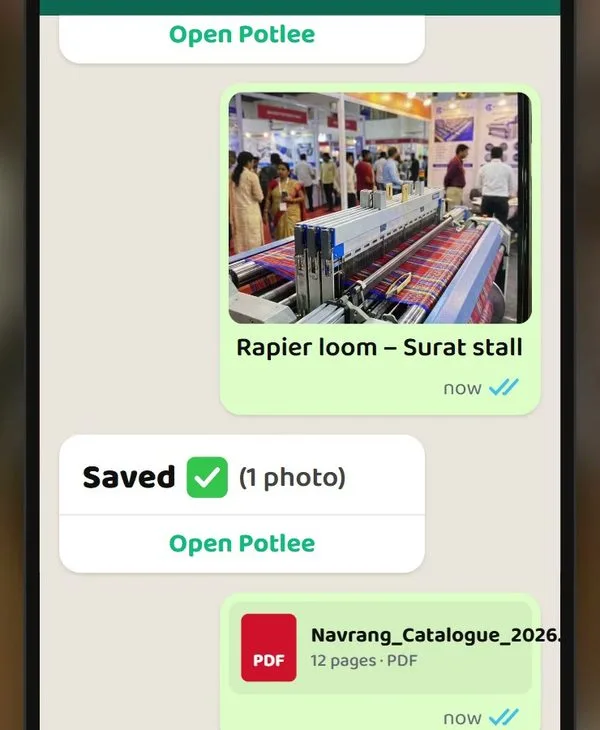
4. Photos, selfies and machine videos
Film the loom running; it says more than any brochure.
🔗 youtube.com/watch?v=…Machine demo video
Saved to Potlee ✅🔒 (1 link)Open Potlee
Preview
5. Links too
Forward the supplier's website, a YouTube demo or a Google Maps pin. Potlee keeps the link with its preview.
Preview
6. Everything at potlee.app
Open potlee.app on your phone or laptop: every save from the show, with tabs for cards, photos, voice notes and files.
🔍 rapier loom Surat
Visiting cardSales Head · Rapier-loom maker, Surat
Voice note“Rapier loom, model R-190, 4.2 lakh…”
Catalogue_2026.pdfRapier looms, page 4
Preview
7. Find anyone fast
Search by name, company, product or city. Type “rapier loom Surat” and it comes back.
Potlee-cards.xlsx
Title
Company
Phone
Sales Head
Rapier-loom maker
98XXX XXX17
Director
Dye supplier
97XXX XXX42
Manager
Ring-frame maker
99XXX XXX08
Partner
Embroidery dealer
90XXX XXX53
Preview
8. Excel of every contact
Download all your cards as an Excel sheet, or as phone contacts. It opens in Google Sheets too.
Scan to get PotleeWhatsApp opens with the message ready; press send.
Coming soon. Your company sends two, five or ten people to an expo. Each one collects on their own phone, and the boss waits for a report. With a Potlee team plan, the whole team will send to one Potlee and the report will make itself. Ask us on WhatsApp and we will tell you first.
Team Acme5 members
Ravi14 stalls · 31 photos
38 saves
Neha11 stalls · 6 catalogues
29 saves
Amit9 stalls · 12 voice notes
24 saves
Kiran + Sunil15 stalls
41 saves
Coming soon
1. One Potlee for the visiting team
Two, five or ten colleagues each send on their own WhatsApp. It all lands in one team Potlee.
Team report · Day 2 · Sat 5 Decauto
Suppliers metacross 6 halls
32
Shortlisted2-for-1 twisters, winders
7
Prices notedfrom voice notes
12
Open questionsto ask tomorrow
4
Coming soon
2. Day-wise team report, automatic
Each evening Potlee makes the day's team report: suppliers met, highlights, open questions.
Who collected whatDay 2
Ravi31%
Neha24%
Amit20%
Kiran14%
Sunil11%
Coming soon
3. Who collected what
See each person's effort: stalls visited, cards, photos, notes. Credit where it is due.
Rapier-loom maker · Suratmet by 3
Sales Head · rapier-loom maker SupplierShortlisted
Ravi · voice noteR-190 rapier loom, 4.2 lakh
Neha · catalogue18 pages
Amit · 6 photos, 1 videoloom running at stall
Coming soon
4. One supplier, everything in one place
Three colleagues met the same supplier? Their cards, photos and notes are merged on one page.
Shortlist · rapier looms3 suppliers
Rapier-loom maker · Surat4.2 lakh · demo next week
Visiting as a team?Scan to ask about a Potlee team plan on WhatsApp.
Your expo with Potlee
From the first stall to the last follow-up
1Weeks before
Get ready
You: get Potlee on WhatsApp and register on the expo's official site.
Potlee: works from day one, so you can try it on everyday saves before the show.
As a teamComing soon one team Potlee for all your colleagues.
One-step sign-upTry it at home
2At every stall
Snap and send
You: send the card first, then the catalogue, machine video and a voice note.
Potlee: reads every card and writes every voice note down as text.
As a teamComing soon everyone sends from their own phone into one team Potlee.
Card firstCatalogueVoice to textVideos
3Every evening
See your day
You: open potlee.app wherever you are staying.
Potlee: everything from today in one place, with tabs for cards, photos, voice notes and files.
As a teamComing soon a day-wise team report for the boss.
All your savesTabs by type
4After the show
Decide and follow up
You: call back the suppliers that matter, while the show is fresh.
Potlee: search any name, company, product or city; download every contact as Excel.
As a teamComing soon a trip summary of what the visit produced.
SearchExcel
Smart Visitor · as a team
Visiting an expo as a team Coming soon
Your company sent a team to an expo. Will they come back with a report?
Owners rarely walk the halls themselves; they send a team of two, five or ten people. Each one visits stalls, takes photos, meets people, records voice notes, swaps visiting cards and discusses prices, all on their own phone. Nothing comes to one place. Then the boss asks for a visit report, and it takes hours of work every evening, or weeks after the trip. The company has spent lakhs on travel, hotels and passes. If the team comes back without a clear report, that money is gone.
2–10people a company sends to a big show
₹ lakhson travel, hotels and passes
Hourseach evening to write the visit report
1Potlee for the team, one report for the boss (coming soon)
Without Potlee
Cards, photos and notes spread over every team member's phone
Two people visit the same supplier; nobody visits the one that mattered
Voice notes and photos nobody else in the team ever sees
The boss gets the report days late, or never
No way to see who found what, or what the trip produced
With a Potlee team plan (coming soon)
One Potlee for the whole visiting team; everyone sends on their own WhatsApp
A day-wise team report, made automatically every evening
A dashboard of who collected what: each person's effort, visible
Everything about one supplier in one place, from every team member
Shortlist and compare suppliers; follow-ups shared with an owner each
Sending a team to an expo?Scan to ask about the Potlee team plan on WhatsApp.Or WhatsApp TEAM PLAN to +91 91068 47981
For companies Coming soon
Your team meets. Potlee collects. One dashboard.
Sending five people to visit an expo, or twenty to run your stand? Companies spend lakhs on travel, hotels and stands, then wait weeks for a report. With a Potlee team plan, everyone will send from their own WhatsApp and the company will see one dashboard: who met whom, what was found, what happens next.
Exhibiting as a teamScan to set up Potlee for your stand.
Potlee in action
Potlee at the expo: photos & videos
Short videos and screens showing how visitors use Potlee at an expo.
3 photos · 2 videos
Hi! Main PotleeCards, catalogues, voice notes: send them on WhatsApp, Potlee keeps them.The expo report, same eveningCards, catalogues and voice notes from a day at the expo.Going to an expo? Take Potlee along.Every contact, in ExcelWhat you can save in Potlee
How to use Potlee at an expo
Get Potlee today, even if the show is weeks away
On your phone, tap "Get Potlee now"; on a computer, scan the QR code. WhatsApp opens with the message ready; press send. No app to install. Use it for your everyday saves until the show.
Register for the expo (official site)
Register as a visitor on the expo's official site. The organiser issues the ID card you need for entry. This is separate from Potlee.
At each stall, send the card first
Snap the card while the person is in front of you, then the catalogue, photos and a voice note. Say the company name in your voice note, and one search for it later brings back the card, the note and the catalogue.
Find it all in the evening
Open potlee.app and search by company, product or city. Your saves are locked; our team can't see them.
Snap the card. Send it to Potlee. Find it tonight.
Days at the expo, hundreds of stalls. Come home with every supplier in one place you can search, not a pocket full of cards.
Forward each visiting card, catalogue, photo, video or voice note to Potlee on WhatsApp as you walk the halls. Potlee reads every card and writes voice notes down as text. In the evening, open potlee.app and search any name, company or product to find it again.
How do I get Potlee?
On your phone, tap "Get Potlee now": WhatsApp opens with the message ready; press send. On a computer, scan the QR code with your phone camera. No app to install.
The expo is weeks away. Should I get Potlee now?
Yes. Get it today and use it for everyday saves, so by the show you already know how it works. Signing up is one WhatsApp message.
Can Potlee's team see my saves?
No. Your saves are locked to your account, and our team can't open them. Only you see what you send to Potlee.
My company is sending a team of five to an expo. Can we get one joint report?
Not yet. A Potlee team plan is coming soon: everyone in the visiting team will send to the same Potlee from their own WhatsApp, with a day-wise report for the boss. Until then, each person can use Potlee on their own, free to start. Ask us on WhatsApp to hear first.
Do I need to install an app?
No. Potlee works on WhatsApp. Sign up with one message, then forward cards, photos, PDFs and voice notes like any chat. Open potlee.app to search and download.
Forward on WhatsApp.Find on Potlee.
Going to an expo? Take Potlee along.
Be a Smart Visitor from the first stall. Cards, catalogues, photos and voice notes, all in one place you can search.